
Website Strategy
WordPress vs Webflow vs Next.js + Sanity: Which Website Fits the Business You Are Building?
·21 min read·Igal Melamed
Updated

Six months after launch, marketing needs a case study in two languages. Sales wants its proof points on the homepage. The contact form must send leads into a new CRM. Which changes can your team make, which need a developer, and what will each one cost? That is the website decision you will still feel a year from now.
For many teams, the shortlist is WordPress, Webflow, or a custom Next.js website with Sanity as its content management system (CMS). We build sites with the third approach when a business needs a distinctive brand experience and room to evolve. But WordPress and Webflow are credible choices, and a comparison is only useful if it shows where each one wins.
The quick decision:
- WordPress fits a team that values familiar publishing, hosting choice and a large plugin ecosystem—and has someone to own updates and security.
- Webflow fits a marketing team that wants to design and launch visually within one managed platform.
- Next.js + Sanity fits a site that needs a tailored brand experience, reusable content, custom integrations and room to evolve—with design and engineering ownership.
The quality of the design and implementation matters more than the platform name.
See the workflows: Explore the Sanity Studio screen, then see how an AI agent can help add a new page.
How we researched this guide · updated October 4, 2026. We reviewed official documentation and product examples from WordPress, Webflow, Next.js and Sanity; checked published prices from Webflow, Sanity and Vercel; and used Google's performance guidance. We also checked each platform's official developer guidance for AI-assisted page creation. The screenshots come from official product sources. Prices were checked October 2 and are a dated snapshot. The speed analysis explains what to measure and control; it is not a benchmark of identical live sites.
First, what are we comparing?
WordPress here means the free, open-source software from WordPress.org on hosting you choose. WordPress.com is a separate managed hosting service with its own plans. The software can be extended with themes and plugins, and a modern block theme gives editors a visual Site Editor.
Webflow combines a visual site builder, CMS and managed hosting. A published site on a custom domain needs a paid Site plan. A Workspace plan covers the people and staging workflow around those sites; a paid Workspace is not automatically required for one published site. See Webflow’s plan explanation.
Next.js + Sanity is a custom stack, not a single subscription. Next.js builds the public website. Sanity stores and presents structured content for editors. A host such as Vercel runs the site. AI can accelerate drafting components, migrations, testing and iteration, but it does not choose the content model, protect accessibility or verify the finished experience. The Next.js production checklist and Sanity’s Next.js integration guide show how much of the result is an implementation decision.
What you actually receive with a custom site
A Next.js + Sanity proposal should specify five tangible deliverables, so you know what your team will be able to use after launch:
- A public website: responsive page templates and reusable components designed for your brand and buyers. Visitors see this site, not the Sanity admin interface.
- A private content workspace: Sanity Studio configured with agreed content types and fields—such as services, case studies, articles, quotes and calls to action. Your editors can change those fields without touching code.
- A publishing workflow: draft content, preview it in context, then publish. The exact preview, permissions and approval steps must be included in the project scope.
- A handover: access to the domain, hosting and CMS accounts, source code and a short guide to routine updates, with ownership defined in the agreement.
- An operating plan: who handles framework and dependency updates, monitoring, backups, incidents and new features after launch. Ongoing support should be priced explicitly rather than assumed.
This distinction is central: your team manages planned content in Sanity; changes to the site's layout or behavior remain design and development work.
Inside Sanity Studio: what your editors actually do
Sanity Studio is the private workspace where your team changes the content on your website. The real screen below shows its basic pattern: choose a content type, open an item, update the fields and publish. The example comes from Sanity's official documentation; it uses movies so you can see the interface clearly. A Studio built for your business would instead show the content types and fields agreed for your site.
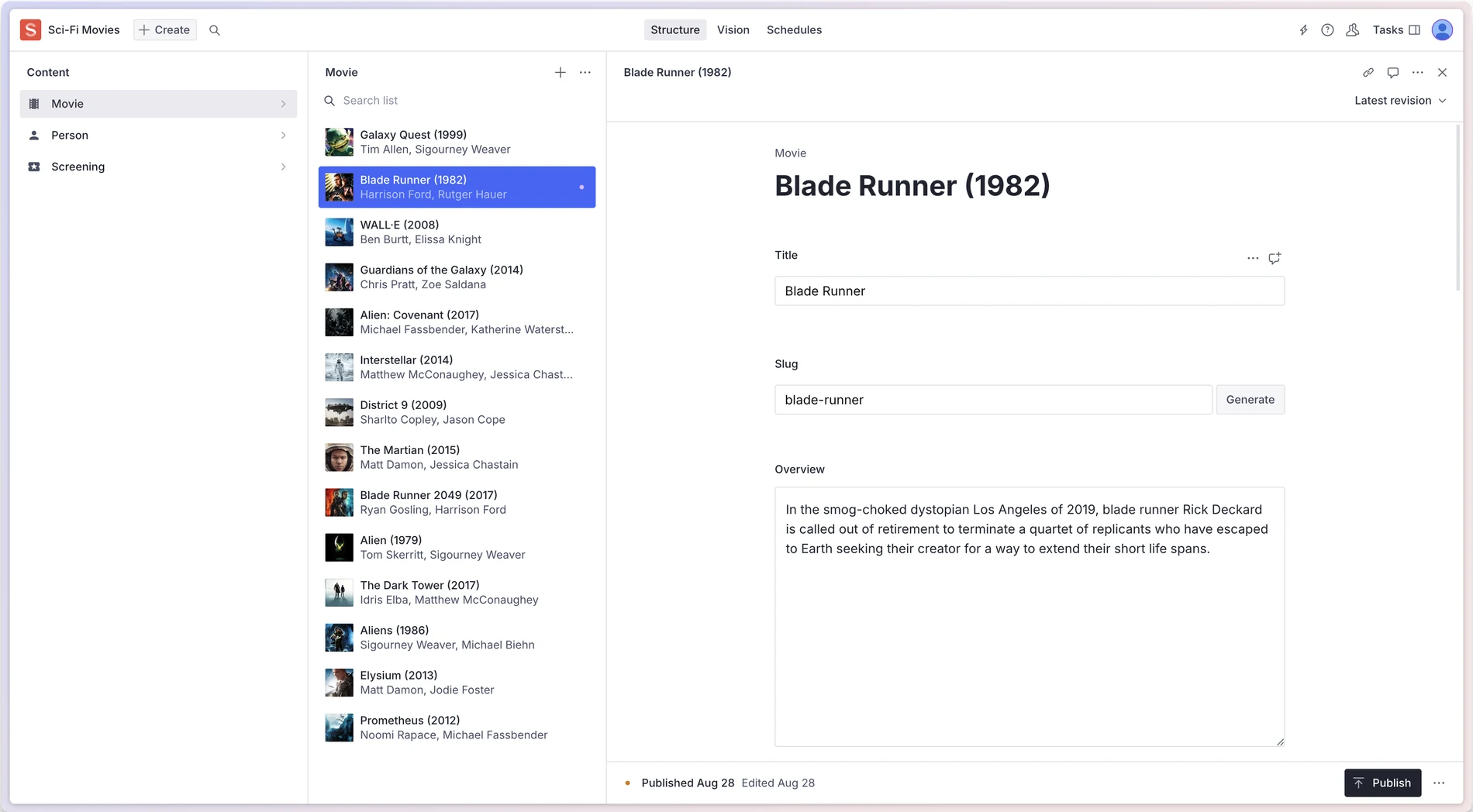
Step 01
Choose a content type
The left column lists what the team can manage. This demo says Movie, Person and Screening; your Studio could say Services, Case Studies and Articles.
Step 02
Open a content item
The middle column lists existing entries. Select one to update it, or use Create to add a new entry.
Step 03
Edit fields, then publish
The right column holds the editable fields. This close-up shows Title and Slug; the full screen also shows Overview and the Publish button at the bottom.
See the page before you publish
When Presentation is configured, the draft page appears beside its editable fields. Select content in the preview, make the change, check the result, then publish.
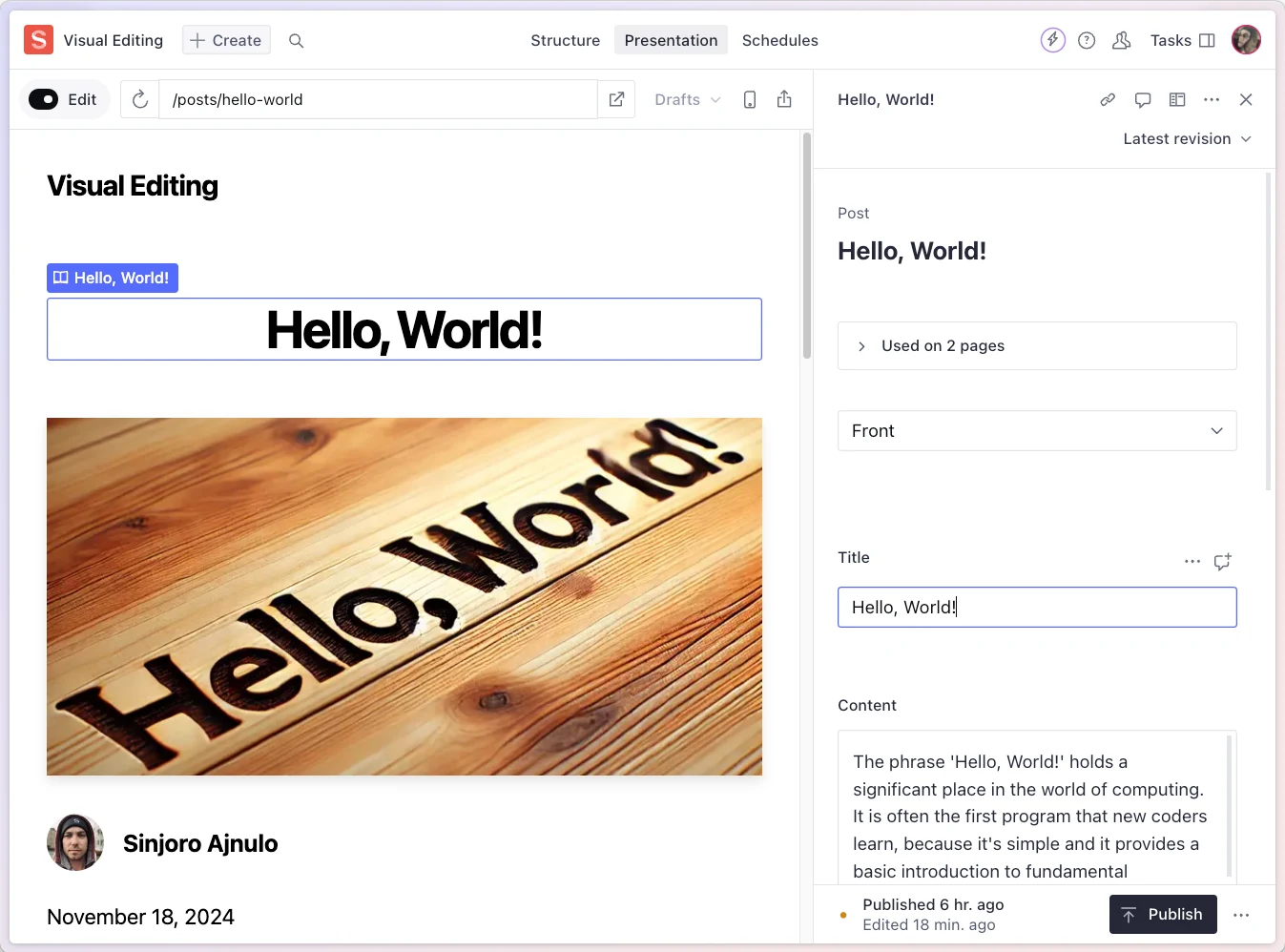
For a case study, those fields might be the headline, hero image, challenge, solution, proof points, quote and search description. Your editor fills them in; the site displays that content in the designed page template. If visual preview is included and configured, the editor can review a draft page before publishing. You should ask to see this workflow using your own content during the project handover.
The comparison at a glance
Swipe sideways to view every column.
| Decision factor | WordPress | Webflow | Next.js + Sanity |
|---|---|---|---|
| Best fit | Content-led sites using familiar publishing and plugins | Design-led marketing sites with a visual workflow | Distinctive, evolving sites with custom behavior and structured content |
| Initial launch | Often quick with a theme; custom work takes longer | Fast for teams fluent in its designer | Requires design, development, CMS modeling and QA |
| Everyday editing | Blocks, posts and pages; experience varies by theme and plugins | Visual editing plus CMS Collections | Editor tailored to your content model; quality depends on setup |
| Design freedom | Broad, especially with custom themes | Strong visual control inside the platform | Full frontend control, with corresponding engineering responsibility |
| Performance | Can be excellent with sound hosting and a lean build | Can be excellent; media, scripts and interactions still matter | Fine-grained rendering and delivery control; no automatic speed guarantee |
| SEO and accessibility | Strong tools; implementation and testing still needed | Built-in controls and audits; testing still needed | Deep control through code; more to configure and maintain |
| Integrations | Large plugin ecosystem plus custom code | Native features, apps and custom code | API-first custom integrations, often more development work |
| AI-assisted expansion | APIs and an optional agent adapter; theme and plugin changes need review | An agent can work with pages, design and CMS through Webflow's MCP tools | Agents can propose versioned route and component changes, with optional access to Sanity content |
| Analytics and experimentation | Plugins, scripts or custom setup | Native and third-party options, sometimes add-ons | Choose the data model and tools; implement consent and events yourself |
| Languages and RTL | Usually a multilingual plugin or multisite | Localization add-on and locale-specific styles | Sanity content locales plus custom routing and layout work |
| Ecommerce | WooCommerce and other extensions | Separate Ecommerce plans | Requires a separate commerce and checkout service |
| Updates and security | Core, themes, plugins, backups and hosting need a responsible person or paid service | Platform infrastructure is managed; site settings and custom code still need care | Hosting and CMS infrastructure can be managed; application code needs an owner |
| Portability | Open-source software and export tools | Static code export has important dynamic-feature limits | Source code can move hosts; Sanity data can be exported, but migration takes work |
| Recurring platform bill | Hosting, domain, security and maintenance work, plus optional paid tools | Site plan, possibly Workspace and add-ons | Hosting, CMS seats or usage, domain and other services |
There is no honest universal winner in every row. The useful question is which constraints your business expects to hit first.
What editing feels like on a Tuesday
Imagine marketing needs to publish a new case study: headline, hero image, proof points, quote and call to action. The editor should be able to do it confidently without asking a developer to fix the layout afterward.
WordPress: familiar blocks, broad flexibility
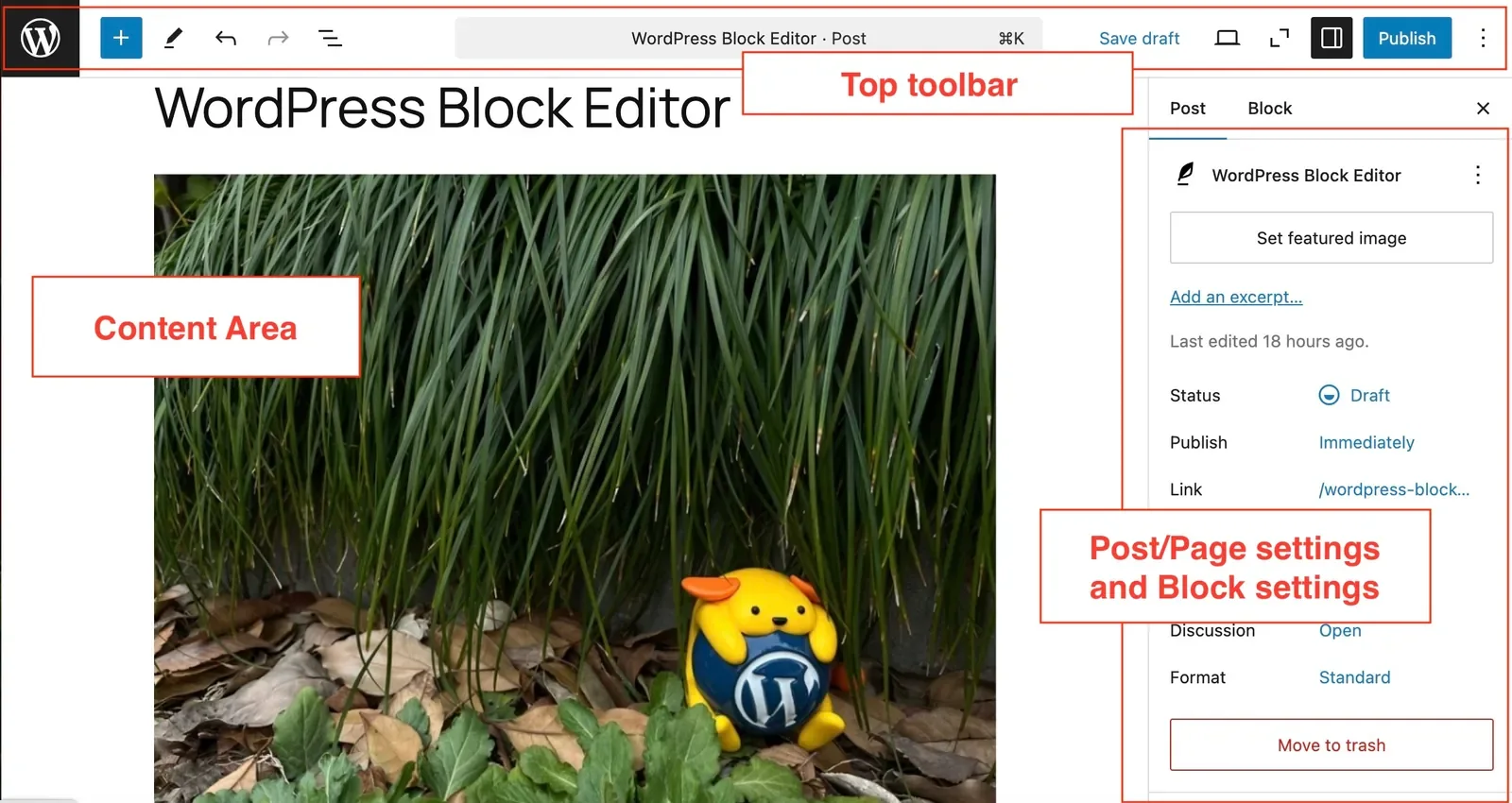
WordPress gives editors posts, pages and blocks. In a block theme, the Site Editor can also change templates, navigation and global styles. That freedom is useful, but the exact editing experience depends on the theme, block setup and plugins chosen for the project. A carefully configured WordPress site can keep reusable page patterns and content fields orderly; a heavily extended one can make a simple update feel like a hunt through several interfaces. The block editor guide and Site Editor guide show the native workflow.
Webflow: edit close to the finished page
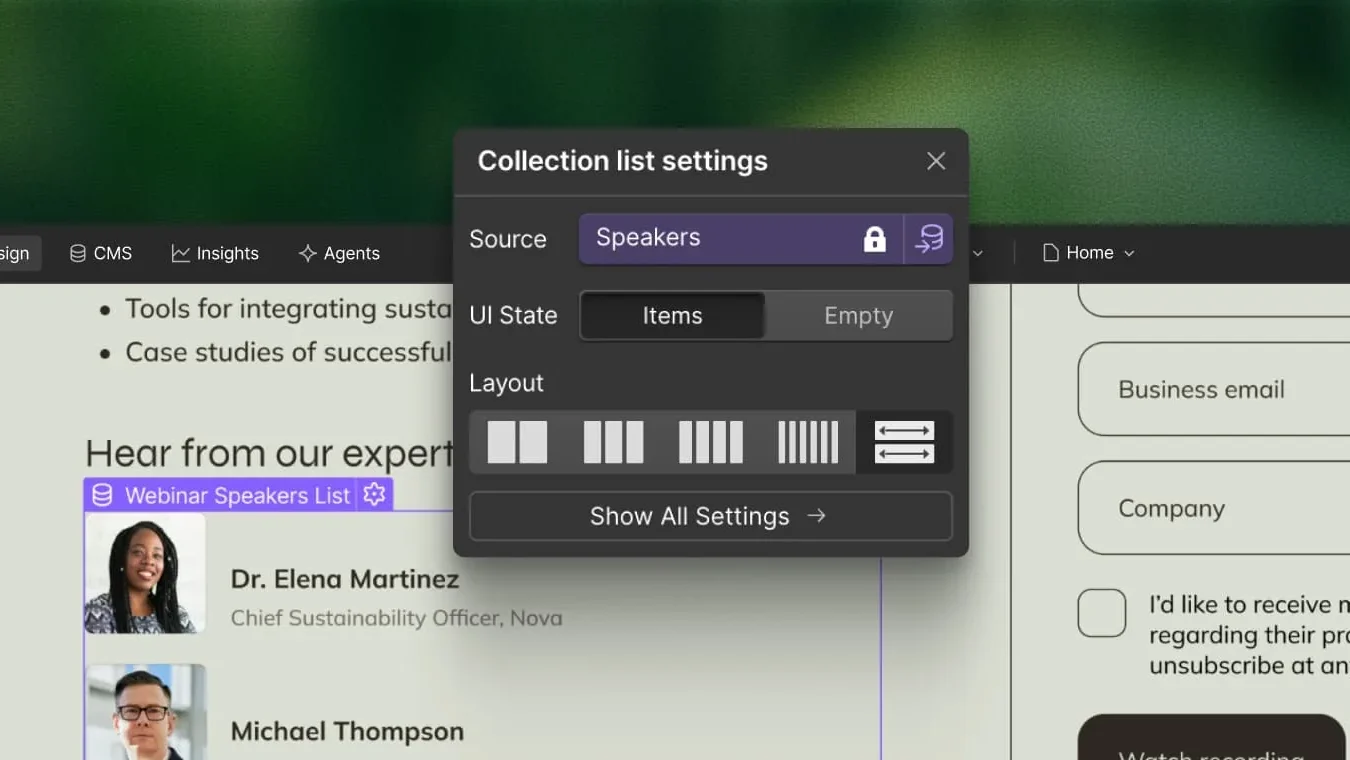
Webflow is attractive when designers and marketers want to see the page while working. Its CMS Collections hold repeated content such as articles, people or case studies, and content editors can work within permissions set for the site. That is convenient for a marketing team whose pages fit a well-planned visual system. The trade-off appears when a new content type, complex relationship or unusual behavior outgrows the original setup. See Webflow’s content editing and CMS Collection guides.
Sanity: design the editor around the work
Think of Sanity Studio as your team's private content desk. To publish a case study, an editor opens the relevant content type, creates a new item and fills in the fields built for that site: headline, hero image, challenge, solution, proof points, quote and SEO details. The same approved information can then appear in a case-study page, a homepage card and a related-service section without copying a whole page three times.
The walkthrough above shows the actual Studio layout and an example of Visual Editing and Presentation. The Sanity editor workflow covers the final review and publish step. Sanity does not automatically know your content types or editorial rules: the team building the site must define them, connect previews and set sensible access permissions.
For editors, the routine is simple once the Studio is configured: choose a content type → edit its fields → check the preview → publish. A new layout, content type or integration still needs design and development. Ask to try this workflow with your own content before accepting the handover.
The practical test is to ask the person who will publish content to perform three real tasks in a prototype: create a case study, revise a shared call to action and preview an unpublished change. Count the decisions and errors, not just the clicks.
Speed: potential is an engineering choice
It is tempting to say “Next.js is faster.” That is too broad. A lean WordPress site with good hosting and caching can perform well. Webflow provides a global delivery platform but warns that oversized images, third-party scripts, embeds and interactions can slow a site. A Next.js team can choose static rendering, caching, image optimization and code delivery in detail—and can still ship a slow site by adding large scripts or careless media. Those trade-offs are documented in the WordPress performance guide, Webflow speed guide, and Next.js production checklist.
For a fair comparison, measure the actual pages your customers use on mobile: homepage, product or service page, article and contact or lead form. Google’s Core Web Vitals focus on Largest Contentful Paint (LCP, good at 2.5 seconds or less), Interaction to Next Paint (INP, 200 milliseconds or less) and Cumulative Layout Shift (CLS, 0.1 or less), evaluated at the 75th percentile of real visits. PageSpeed Insights also shows laboratory diagnostics; its field data reflects the previous 28 days when sufficient data exists. A single Lighthouse score on unrelated demo sites cannot prove which platform is inherently faster.
Our reason to favor a custom build for a demanding site is control: we can set a performance budget, keep the first view light, defer nonessential scripts, optimize images, and revisit pages as content grows. The promise should be a measurable process and accountable results—not a magic score from choosing a framework.
SEO, AI search and accessibility
All three approaches can support page titles, descriptions, clean URLs, redirects, sitemaps, structured data and social previews. WordPress offers native settings and plugins; Webflow provides SEO controls; Next.js provides metadata and sitemap APIs. None creates a useful search presence from thin content or guarantees rankings. Google says Core Web Vitals contribute to page experience, but good scores alone do not guarantee top results.
For a B2B company, the stronger opportunity is often information architecture: a clear explanation of the offer, useful pages for each buyer question, evidence and case studies, consistent internal links, and content that can be revised without breaking URLs. A structured Sanity model can make this especially manageable across product lines and markets. It still needs an editorial strategy and implementation. AI-generated copy also needs review for accuracy, originality and relevance, as Google’s guidance on generative AI content makes clear.
Accessibility is similarly a product of decisions. Keyboard paths, contrast, labels, semantic structure, captions and screen-reader behavior must be checked on the finished site. Webflow’s Audit panel catches some issues; code linting can catch some Next.js issues. Neither replaces testing with real content and interactions. Read more about how we approach UX/UI design and the review of AI-generated interfaces.
Brand expression, integrations and new markets
WordPress can be designed almost any way with the right theme and development. Webflow gives designers unusually direct visual control, particularly for campaign and marketing pages. Next.js leaves the frontend open for distinctive interactions, product-like flows and unusual page structures. That freedom is valuable when a buyer must understand an invisible or complex offer—and expensive if the site only needs five conventional pages.
The same pattern applies to integrations. A plugin may connect WordPress to a CRM quickly. Webflow offers native features, apps, APIs and embeds. Next.js can connect directly to APIs for lead routing, personalization, gated resources or product data, but each custom integration needs implementation, monitoring and maintenance. List the systems that must exchange data before choosing a stack.
For multilingual sites, compare the whole workflow: translation, preview, localized URLs, alternate-language metadata, and right-to-left design where needed. WordPress typically uses a multilingual plugin or multisite approach; Webflow offers Localization as an add-on; Sanity can model localized content, while Next.js needs locale routing and layout implementation. Hebrew support means more than translating strings: forms, mixed English terms and directional icons need review.
If the core business is ecommerce, make a separate decision. WordPress can use WooCommerce; Webflow has separate Ecommerce plans; Next.js + Sanity needs an additional commerce and checkout system. A custom marketing site can coexist with a commerce platform, but Sanity alone is not a checkout.
Security, maintenance and ownership
WordPress gives you deep control and a large ecosystem. The software is free; operating a secure business website is ongoing work. Someone must keep WordPress, themes, plugins and the hosting environment current; control access; watch for problems; back up both files and database; and know how to restore the site. WordPress's own security guide, update guidance and backup guidance describe these responsibilities. Some updates can be automatic and free backup tools exist, so a paid security plugin is not mandatory. The unavoidable cost is the time of a responsible person, a managed hosting service or a maintenance agreement. Ask who performs the work, what is included, and how recovery is tested.
Webflow manages much of the hosting and platform layer. Your team still owns roles, forms, third-party scripts, content and published changes. A Next.js + Sanity project on Vercel similarly delegates infrastructure to providers, while your team or agency remains responsible for application dependencies, secrets, integrations, access controls and deployments. A custom stack does not eliminate maintenance; it changes what is maintained.
Ownership is more nuanced than “open” or “locked in.” WordPress is GPL software and offers content export. Webflow lets eligible Workspaces export static HTML, CSS and JavaScript, but the export does not carry over the working CMS, forms, search and other dynamic features; CMS items can be exported separately. Next.js code can be self-hosted, and Sanity supports dataset export. Moving either still takes engineering work. Ask who owns the domain, code repository, design files, content dataset and service accounts—and whether the agreement includes a documented handover.
What the subscriptions actually cost
Prices checked October 2, 2026. All amounts below are USD before applicable taxes. Vendor prices and quotas change; follow the linked pricing pages before signing. These are platform fees, not a quote for strategy, design, build, content, domain, AI coding tools, support or future changes.
Swipe sideways to view every column.
| Stack | Published business site: starting platform charge | What can increase it |
|---|---|---|
| Self-hosted WordPress.org | WordPress software: $0; hosting and domain are separate and vary by provider | Budget separately for security updates, monitoring, backups and recovery—whether handled in-house or bought through managed hosting or support. Premium themes, plugins and email may add fees. WordPress.org hosting guide |
| Webflow | Basic $15/month when billed annually for a site without CMS; Premium $25/month when billed annually for a CMS site. Premium is $39/month on monthly billing. Webflow pricing and 2026 plan update | Paid Workspace features, collaborators, Localization, ecommerce, higher bandwidth and other add-ons. A free Starter site uses a Webflow subdomain. |
| Next.js + Sanity on Vercel | Next.js framework: $0. Vercel Pro: $20/month, including one deploying seat and $20 of monthly usage credit. Sanity Free: $0 within its limits. A basic commercial setup can therefore start at $20/month in these two service fees. Vercel Pro; Sanity pricing | Vercel usage beyond allowances, more deploy seats, Sanity Growth at $15 per billable seat/month, CMS usage, email, search, analytics, other services and maintenance. |
Two details matter. First, Vercel’s free Hobby plan is restricted to personal, non-commercial use, so it is not the baseline for a client business site. Next.js can run on other hosts, but Vercel is the hosting scenario priced here. Second, a Sanity Free project can be enough for a very small team: the current Free plan lists up to 20 seats, 10,000 documents and 1 million CDN API requests per month. Its two roles are Administrator, which can edit and manage the project, and Viewer, which cannot edit. A client team that needs editor-only permissions, comments or scheduled drafts should budget for Growth at $15 per billable seat per month plus applicable usage. For example, Vercel Pro and Sanity Growth with two billable seats start at $50/month in those two service fees, before extras. The $20 Free-plan example is arithmetic for a minimal configuration, not a promise about the bill for every site.
For a decision that will last, compare three-year total cost, not just the subscription shown on a pricing card:
Discovery + design + build + migration + 36 months of hosting, CMS, seats, plugins, add-ons and usage + maintenance, security and QA + the changes you already expect to request.
That last term is often the deciding one. A lower initial build cost is less persuasive if every new content type or campaign page requires a workaround. Conversely, an expensive custom architecture is hard to justify for a stable brochure site. Ask every supplier for the same scope and the same assumptions about traffic, editors, languages, integrations and support. Then compare the cost of a real future change, such as adding a new product line or localized case-study library.
How an AI agent can help create the next page
Suppose you need a new page for an industry, service or campaign next month. A page has two parts: what it says, and how it looks and works. In a Next.js + Sanity setup, editors manage words and images in Sanity; the site's page designs and components can live in a version-controlled Git repository. The next step depends on whether you can use a page pattern you already have:
- A new page using an approved pattern: An editor can create a Sanity entry, fill the agreed fields, preview it and publish it. An authorized agent can help prepare the draft through Sanity's MCP server. This can happen without changing site code when the page template and publishing setup already support new entries.
- A new layout, interaction or integration: A coding agent such as Codex or Claude Code can inspect the existing design rules and components, add a Next.js page, and add new Sanity editor fields and connect them to the page if needed. The team can inspect the change and a Vercel preview, test the page, and approve a specific version for release. Each code change has a record that can be reviewed or reverted. OpenAI has documented this kind of Codex-to-preview workflow; Claude Code can also work on a GitHub repository and propose a pull request.
This article offers a concrete third example. Studio Melamed's Insights section currently uses MDX files in Git. We built and checked this article in a Vercel preview before publishing the reviewed version. An agent can propose another article or revision in the same way. In a client site connected to Sanity, the frontend and content model can be versioned in Git, while editorial documents live separately in Sanity Content Lake with their own revision history. The Sanity screens above show the CMS workflow a client project can be built to use; they are official product examples, not this site's editing screen.
WordPress also offers an agent adapter, and Webflow's MCP server can work with pages, design elements and CMS content. AI access is available across these platforms. The practical advantage of a well-maintained custom codebase is that an agent can use your own components and content model, propose a visible change, and follow a review-and-preview process. The quality and speed of that process depend on how the project is built. Agent subscriptions or API usage add costs beyond the hosting and CMS fees above.
Where AI changes the project—and where it does not
AI-assisted development can help a skilled team prototype faster, generate routine code, migrate content and explore more options. It can also produce plausible pages that are slow, inaccessible, generic or hard to edit. We use it as an accelerator under human design and engineering judgment. The work still starts with audience, content, brand, editing workflow and measurable quality gates.
For a custom project, that means a concrete sequence:
- Map the buyer journey and content: identify the decisions a visitor must make and the evidence the site must show.
- Design the system: define page patterns, components and a Sanity schema that editors can use without breaking the visual hierarchy.
- Build with AI assistance and human review: accelerate repetitive work while reviewing code, copy, integrations and edge cases.
- Test the publishing workflow: have the client team create, preview, revise and publish realistic content before handover.
- Measure the live experience: check mobile performance, accessibility, search metadata, forms and analytics, then keep improving after launch.
The payoff is operational as well as visual: the same approved product facts, proof points and case-study fields can be reused without copying and pasting whole pages. The team can launch new content with fewer layout decisions, while developers can extend the site without rebuilding its foundation. That efficiency only appears when the schema and component system fit the people using them.
For our clients in complex and trust-sensitive markets, the site's job is to make an unfamiliar offer clear and credible. That takes more than a framework choice. It takes the outside eye that decides which message, interaction and visual detail helps a buyer understand and trust the company. See how that thinking appears in our selected work and our approach to design systems for AI-generated UI.
Which one should you choose?
Choose WordPress if your team is comfortable with its publishing model, you need the breadth of its plugin ecosystem, and you have a clear owner for hosting, updates and backups. Choose Webflow if visual production speed and day-to-day marketing autonomy are the priority, and your content and integrations fit its platform model. Choose Next.js + Sanity when the site needs a distinctive frontend, reusable structured content, tailored editing, custom integrations and a roadmap that will keep changing—and when you are prepared to fund design and engineering ownership.
If your site is small and rarely changes, a well-made WordPress or Webflow site may be the best business decision. If the website must explain a complex product, support several teams and markets, and keep evolving, a custom Next.js + Sanity build can give you more room to move. Its advantage comes from the experience and content system we deliberately design, then test and improve—not from AI or Next.js by themselves.
Planning a new site? Bring us the pages your team needs to publish, the systems it needs to connect, and the next change your current site cannot handle. We will map the right architecture, the editing workflow and the operating cost before recommending a build. Book a conversation, or explore our selected work.
Source and screenshot note
The product screenshots above are examples retrieved from WordPress documentation, Webflow product imagery, and Sanity's Studio and Presentation documentation in October 2026. They show different example projects and may depict earlier product versions, so they illustrate editing interfaces rather than a controlled usability test. Pricing is a dated snapshot; product capabilities and plan limits can change. Performance and accessibility judgments here are based on vendor documentation and published web standards, not benchmark scores from comparable live sites. For a procurement decision, test the exact proposed page types, users and traffic assumptions with the team that will build and maintain the site.